Ofir Notify enables to customize the alerts sent to Chats or Channel.
This is based on using text files as templates.


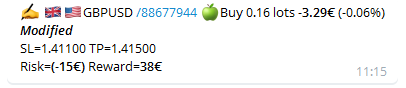

By default, we provide basic templates that you can change with any text editor.
Example of a customization
\x2714 TRADE CLOSED ID=#ticket#
#itype# #type#: #symbol#
\xF4CF Lots: #lots#
\xF4B2 Entry price: #price#
-------------------
\x2705 Close price: #closedprice#
\xF3C6 WIN: #profit%#
\xF4B0 Profit: #profit# (#profitpips# pips)
-------------------
\x2764\xF4B5CONGRATULATION \xF4B5\x2764
\xF64F [Web Site](www.autotrade-gold.fr)
Provided templates
- Notify.txt, for alerts sent to Chats
- Channel.txt for alerts sent to Channels
- Icons.json, default set of icons used in alerts.
Those files should be placed on the directory : MQL4\Files\Ofir\docs\ (or MQL5 if using MT5). Directory can be found by selecting File\Open data folder in Metatrader menu.
You can change those files.
You can also create new templates for specific events.
For Chats, Notify.txt is the template by default.
- Create NotifyOpen.txt to be used when a trade is opened
- Create NotifyClosed.txt to be used when a trade is closed
- If you need a specific template for profit trades, create NotifyClosedWin.txt
- If you need a specific template for loss trades, create NotifyClosedLoss.txt
- Create NotifyModifed.txt to be used when a trade is modified (StopLoss, TakeProfit or Entry price)
For Channels, Channel.txt is the template by default.
- Create ChannelOpen.txt to be used when a trade is opened
- Create ChannelClosed.txt to be used when a trade is closed
- If you need a specific template for profit trades, create ChannelClosedWin.txt
- If you need a specific template for loss trades, create ChannelClosedLoss.txt
- Create ChannelModifed.txt to be used when a trade is modified (StopLoss, TakeProfit or Entry price)
How to modify a template
For example, Notify.txt
#ievent# #flag##symbol# /#ticket# #itype##type# #lots# lots *#profit#* (#profit%#)
*_#event#_*
SL=#sl# TP=#tp#
Risk=*#risk#* Reward=*#reward#*| List of keywords to be used in template files | ||
| Keyword | Description | Example |
|---|---|---|
| #ticket# | Order ticket numer | 123456789 |
| #symbol# | Order symbol | EURUSD |
| #comment# | Order comment | Ofir UEA (created by Ofir Universal EA) |
| #flag# | Order symbol flag |  |
| #type# | Order type | BUY |
| #itype# | icon for Order typel |  |
| #lots# | Order Lots | 0.55 |
| #profit# | Order profit | 10.23 € |
| #profit%# | Order profit in % of equity | 0.5% |
| #profitpips# | Order profit in pips | 10 |
| #price# | Order open price | 1.19805 |
| #closedprice# | Order closed price | 1.19850 |
| #opentime# | Order open time | 2021.12.24 11:10 |
| #closetime# | Order close time | 2021.12.24 11:30 |
| #sl# | Order Stop Loss | 1.19750 |
| #tp# | Order Take Profit | 1.19805 |
| #slpips# | Order Stop Loss in pips | 10 |
| #tppips# | Order Take Profit in pips | 20 |
| #risk# | Order Risk | -15€ |
| #risk%# | Order Risk in percentage of equity | -1.2% |
| #reward# | Order Reward | 30.00€ |
| #event# | Event which send the alert (Open, Closed, Modified) | Open |
| #ievent# | Event’s Icon | |
| #equity# | Account equity | 1023 € |
| #period# | TimeFrame | M5 |
In addition, to these keywords, you can use emojis in template.
You can access the site Full Emoji List to find the icon your are looking for. Once you find the icon (for example a Dog Face, which code is “1F431”), put in template \xAAAA where AAAA are the last four digits of the icon’s code.